Cute Cat Ergonomic Gaming Chair Guide for Long Sessions
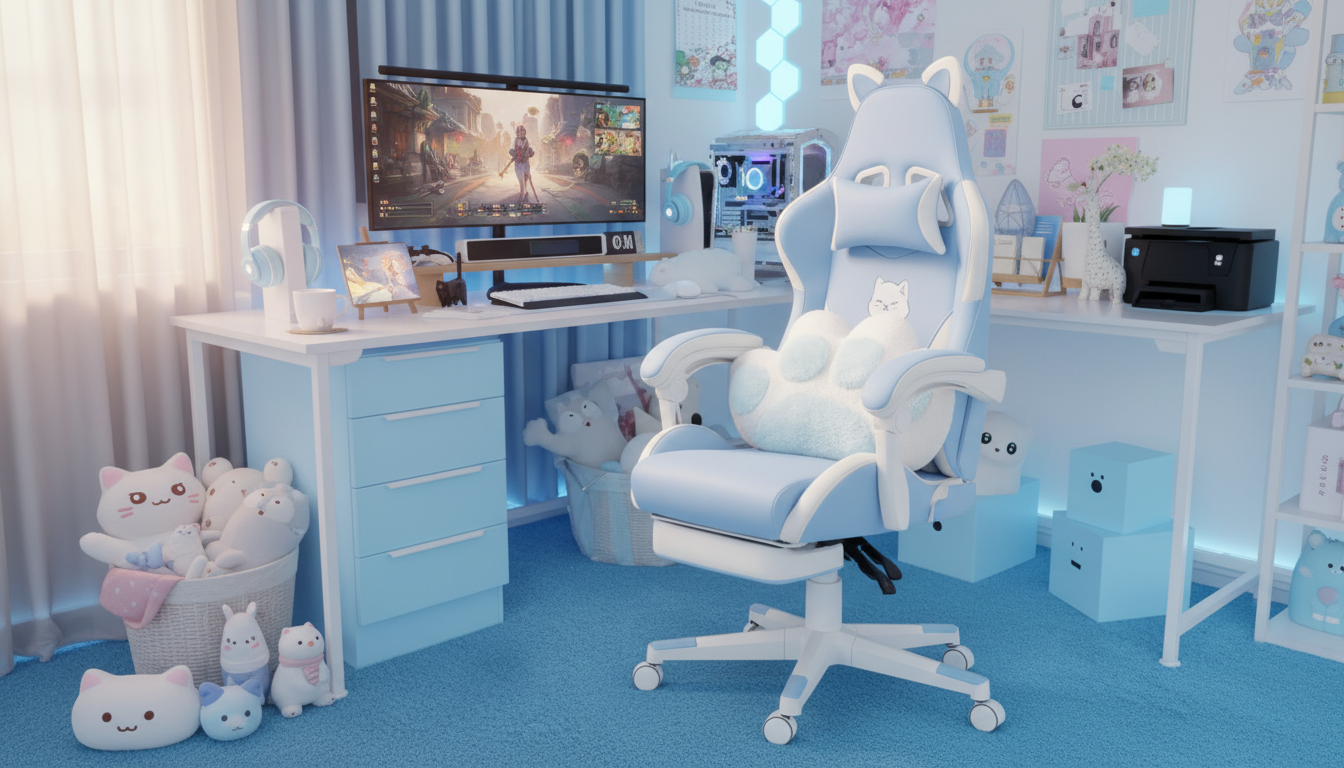
Cute Cat-Themed Ergonomic Gaming Chair: Comfort, Support, and Playful Style for Long Sessions
A cat-themed chair can be more than décor—it can also be a supportive seat for gaming, streaming, studying, or working. The right design blends playful details (like stitched accents and ear-like headrest styling) with real ergonomic fundamentals: a stable base, a supportive backrest, and adjustments that help your body stay in a healthier position for hours.
If you’re shopping for a standout chair that still treats your back and shoulders well, start with the core fit and function, then let the cute cat aesthetic be the finishing touch.
What Makes a Cat-Themed Gaming Chair Feel Ergonomic
Ergonomics is about setting your body up in neutral, low-strain positions: head balanced over shoulders, shoulders relaxed, elbows close to your sides, and feet supported. When a chair is truly ergonomic, you’re not “holding yourself up” all day—your seat and backrest are doing more of the work.
For long sessions, comfort usually comes down to a few high-impact zones:
- Lumbar support (lower back): Helps maintain a natural curve so you don’t slump or over-arch.
- Thoracic support (mid-back): Reduces that tired, rounded-shoulder feeling that creeps in over time.
- Even seat pressure: A supportive cushion and good seat shape help prevent hotspots on your hips and thighs.
A cat theme should never override structure. A stable base, a supportive backrest, and adjustability that matches your body matter more than any decorative ear silhouette.
Design Highlights That Matter for Daily Use
Cat-themed elements can be adorable without being over-the-top. Look for stitched detailing, subtle color accents that work with your setup, and decorative parts that won’t snag on hair, hoodies, or headphone bands. If you have pets, check that cute accents are firmly attached and less tempting for claws.
Beyond the theme, focus on the shape and feel:
- Backrest contour: A supportive contour follows your spine’s natural curve instead of forcing an exaggerated arch.
- Seat edge: A gently rounded front edge can reduce pressure behind the knees during longer sits.
- Decorative durability: Reinforced stitching and clean seams help the chair keep its “new” look even with daily use.
Quick Comfort & Fit Checklist
| Area | What to look for | Why it helps |
|---|---|---|
| Seat height range | Feet can rest flat; knees roughly at hip level | Reduces leg fatigue and improves circulation |
| Lumbar support | Adjustable or well-positioned cushion/support zone | Helps maintain a neutral lower-back curve |
| Armrests | Height (and ideally angle/width) adjustment | Keeps wrists/shoulders relaxed while using mouse/keyboard |
| Recline/tilt | Stable recline with lock positions or tension control | Allows posture changes and reduces static load |
| Base & casters | Stable multi-point base; smooth rolling | Improves safety and repositioning without strain |
How to Dial In the Best Sitting Position
Even a well-built ergonomic gaming chair performs best when it’s adjusted to your body and desk. A few small tweaks can reduce neck tension, wrist strain, and lower-back fatigue.
- Seat height: Set the height so your feet are flat on the floor. If your desk is high and you must raise the chair, add a footrest so your legs stay supported.
- Seat depth: Leave a small gap (about a few finger-widths) between the seat edge and the back of your knees to avoid pressure and numbness.
- Lumbar placement: Place support in the small of your back. If it sits too high, it can push the mid-back forward and encourage slouching elsewhere.
- Armrests: Adjust so shoulders stay down and elbows bend near 90 degrees. Keep wrists straight while typing and mousing.
- Screen alignment: Center your monitor with the top around eye level to reduce neck tilt and rotation. If you use a second screen, avoid leaving your head turned for hours.
For general workstation guidance, you can reference the NIOSH Computer Workstations eTool and the Mayo Clinic’s office ergonomics guide.
Materials, Build, and What to Expect Over Time
How a chair feels in month one can be very different from how it feels after daily use. Materials and build choices determine whether comfort stays consistent or slowly declines.
For broader ergonomics considerations, the OSHA ergonomics resource is a useful reference point.
Assembly, Setup Tips, and Easy Care
Featured Picks Available Now
- Cute Cat-Themed Ergonomic Gaming Chair — a fun statement seat designed for long gaming, study, or work sessions.
- Real Pet Wisdom, From Owners: Essential Pet Advice from Real Owners eBook — practical tips for everyday pet habits that can help protect furniture and keep shared spaces calmer.
- Train Smarter and Make Your Gear Last – Sports Gear Care Guide — a simple care mindset that translates well to keeping chairs and desk gear in good shape.
Who This Chair Style Tends to Suit Best
FAQ
Is a cat-themed gaming chair actually comfortable for long sessions?
Yes—if it has real ergonomic features like supportive lumbar design, a stable base, and adjustments that fit your body. The theme is just style; long-session comfort depends on setup, posture, and the chair’s support zones.
How long does it take to assemble an ergonomic gaming chair?
Most people can assemble one in about 20–45 minutes, depending on experience and how many parts need aligning. Tighten bolts evenly (not aggressively), and re-check snugness after a few days of use.
How should the chair be cleaned without damaging the cute design details?
Use gentle, material-appropriate cleaners and spot-test in a hidden area first. Avoid harsh solvents, and clean decorative stitching or accents with light pressure to prevent fraying or snagging.














Leave a comment